
October 28, 2026
Brand Activation Photography in Dubai: Show the Experience
A product to try, a display to explore or a little challenge can make discovering your business feel fun. You’ve thought about what guests will experience; let’s give people who couldn’t join you a lovely first look too. For your Dubai brand activation, we’ll start with what people can do and what you’d love someone seeing the pictures to understand.
Updated
Need photos of your event?


We had such a wonderful experience with our Travaya photographer during our photoshoot at the Colosseum in Rome! Our photographer was incredibly kind, welcoming and helpful, especially with our baby. We felt comfortable throughout the shoot and even had a lovely time chatting afterwards. The professionalism, talent and friendly approach made the whole experience even more special. We would recommend Travaya a hundred times over! Thank you for such a memorable experience! ❤️
Jan Kaila Fernandez
Read moreWe had a maternity photoshoot with our Travaya photographer and it was great! She instantly knew what we wanted and captured the moments we had in mind so well—it was such a fun shoot ☺️
Nadine Bouali
Source: Google Read moreWe only booked a quick photoshoot but we loved the experience and the photos. The photographer was really kind, and helped us with the poses. All in all, it was a great experience and I completely recommend booking Travaya.
Eszter Tamási
Read moreWe had a great time shooting with Travaya😍✨. They just had the best locations and poses in mind which captured our best moments and just have incredible memories to keep in the form of pictures☺️❤️. The photos turned out to be so great and just absolutely loved this experience😇. The photographers are very lovely and i personally would highly recommend them😊. Thank you so much for this amazing experience🙏🏻✨.
Lakshita
Read moreTo say our experience was wonderful would be an absolute understatement—it was truly extraordinary! Having a two-day photoshoot across the city with our photographers was an unforgettable journey. Traversing the vibrant streets alongside such gifted professionals made exploring the city feel endlessly magical, dynamic, and inspiring. The photoshoot itself was a absolute dream. Both photographers were remarkably professional, exceptionally warm, and impeccably cooperative. Their natural warmth and expert guidance made us feel infinitely comfortable, effortless, and confident throughout every single moment of both days. They created an atmosphere of pure ease where we could simply enjoy the experience and be ourselves. As for the results? We are utterly spellbound! The photos are nothing short of breathtaking masterpieces—each frame captures the mood, elegance, and beauty of the city with phenomenal artistic flair and precision. We wholeheartedly and enthusiastically recommend booking through Travaya to anyone seeking a seamless, top-tier photography experience. It was truly an enchanting highlight of our trip that we will cherish forever!
Shubi
Read moreWe had an amazing experience with Travaya! 🧡 The photoshoot was so much fun, and walking through the city with the photographer made the whole experience even more special. The atmosphere was relaxed and comfortable, and the photographer was so friendly and professional, helping me feel confident and capture beautiful moments. We absolutely love them and will always cherish these memories! 😍✨ We highly recommend Travaya to anyone looking for a fun, memorable, and wonderful photoshoot experience. Thank you for such an unforgettable experience! ❤️📸
Prasun
Read moreTable of Contents
What would you love people to discover?
Start with the part you’re excited to share. Perhaps a product solves a familiar problem, a service becomes clearer when someone demonstrates it or a small activity introduces your company to a new audience. Tell us what makes the experience particular to your business.
Then think about the people who will see the photos afterwards. Someone who wasn’t there may need to understand the activity from a few pictures and a little explanation. Your colleagues may want to see what the team created. A partner may need photographs of its contribution.
Those purposes give the photography a useful direction. We can discuss a collection that shows the setting, the activity and the people around it, with the details that help your own idea make sense.
If you want customers to understand a product
Explain the useful point before the event. “We want people to understand how this helps with [task]. The demonstration at [time] shows [feature], with [person] explaining it.” Add where it happens and what can be shown publicly.
That gives us more to discuss than a general request for “product photos”. The object, the person explaining it and the way it is being used can each help tell the story. Choose the parts that make the benefit understandable without expecting the viewer to guess.
Keep the request for separate product images clear too. A demonstration at an event and a full set of catalogue or studio photographs are different pieces of work. Tell us about both wishes so we can clarify the available coverage and finished pictures before booking.
If your exhibition stand invites visitors to try something
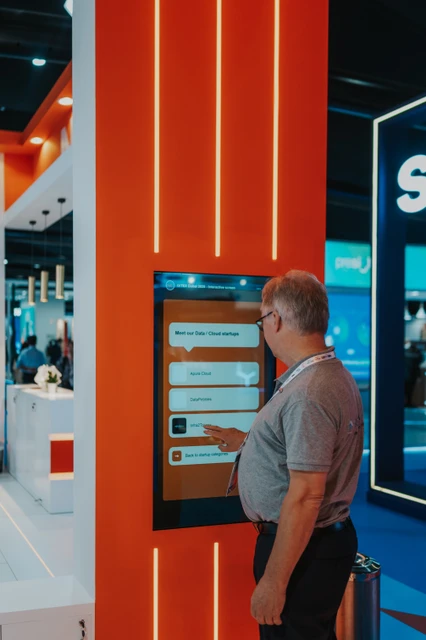
A picture of the finished space introduces what your team created. Photographs of someone trying the activity can explain how it works. The people welcoming visitors and helping them take part give the experience a more personal side.
Tell us where and when to find the important activity. Some demonstrations happen at fixed times, while a screen may be available throughout the day. If you want a particular person or product included, add their availability and the relevant details.
Our guide to planning exhibition stand photography covers the wider stand as well as those interactions. Discuss both if they matter to your company, so the booking has room for the setting and the experience within it.
If the activity introduces your company to a new audience
The photographs may need a little context to explain that connection. A welcome from your team, the activity itself and a clear company sign can help a viewer understand whose experience they’re seeing. Add a short explanation when you share it.
You might brief it like this: “We’re inviting visitors to [activity] so they can discover [idea or service]. We’d like pictures showing the welcome, what people can try and the team helping them. The photos are mainly for [company update or other use].”
Keep the activity recognisable as your own. The people, materials and little details you prepared can be more useful to this story than a general crowd photograph. Tell us which parts carry the idea you want people to understand.
Walk us through the experience in simple steps
Say which part matters most to your business. A demonstration may depend on one short action. A screen experience may show its most useful information after someone makes a choice. Give the photographer a contact who can explain that before the activity becomes busy.
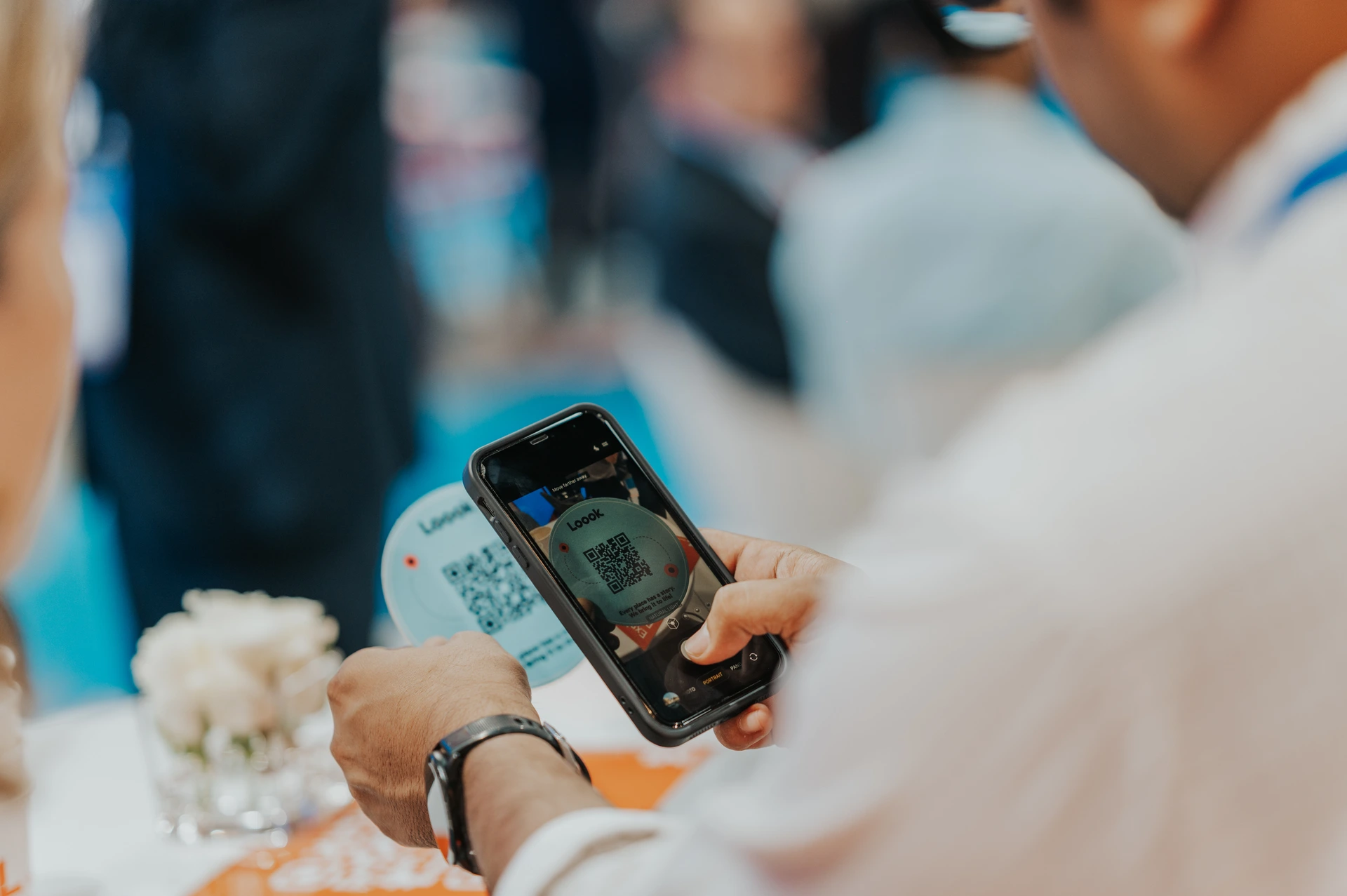
For a QR code or digital activity, be clear about what the photographs can show. A picture of someone holding a phone near a code records that moment. It doesn’t confirm they completed a form, made a purchase or became a customer.
If those results matter to your reporting, use the activity’s own records for them. You can then share the photographs with an accurate explanation of the experience, while keeping any measured results tied to the information your team actually has.
Include the team helping people take part
Give us names and roles where they matter. Perhaps an expert is demonstrating a feature, a founder is briefly joining or different teams will be looking after the activity. Tell us who you’d especially like included and when they’ll be there.
If you want a planned demonstration with your team, arrange it as part of the programme and describe what it is. It can be useful for explaining a product clearly. Keep that context when you share the photos, so a team demonstration is understood as one.
For general visitor coverage, let people explore in their own way. Your photographer can follow the real activity within the agreed plan. The people trying something, the explanations around them and the details of the experience can give you a lovely variety to choose from.
Give the finished setup a little attention too
Tell us which parts will be ready and when access is allowed. A quiet opportunity before opening may suit some events; another may need a suitable moment during the programme. Discuss that time within the booking so it fits the actual setup.
Check that the product, signs and screen content are the versions your team wants shown. If something changes, pass on what is different and which part is ready now. A production or activity contact can help answer those questions on the day.
Then consider the activity in use as well as the finished display. The two sets of pictures have different jobs: one introduces the setting and details, while the other shows what people could do there. Choose the mix around the story you want to share.
Connect the experience with your company naturally
The photographs can show those details alongside the activity. Someone explaining a product or a visitor exploring a display gives the company setting a purpose. Other pictures may focus more closely on the people or the thing they’re trying.
If a screen rotates between products or partners, share the relevant times or content changes. Tell us what you need to be able to show, rather than assuming every version will appear while the photographer is in that area.
Keep the words beside the picture accurate too. A guest beside a sign may be visiting or taking part; it doesn’t automatically make them a spokesperson or customer endorsing your company. Use names and descriptions that match the real role people had in the experience.
Bring partners’ wishes into the same plan
A partner might want its team explaining a product, the activity it supported or a shared company moment. Add the people, location and timing, along with any pictures or delivery deadline you’ve already discussed. The request needs to fit alongside the rest of the coverage.
Our guide to photos for event sponsors and partners explores making those selections useful. It helps to choose who will receive the pictures and give them the names and context they need to share their part accurately.
Travaya’s event packages include commercial use by your company, event sponsors and participating event partners on websites, social media, PR and press releases, presentations, internal communications, reports and printed materials, without extra licence fees for those uses. Particular coverage and delivery requirements still need to be agreed.
Keep the activity comfortable for the people involved
Pass specific instructions to your photographer. Someone staying out of the photographs altogether is a different request from pictures being kept for internal use. Clear information helps the photographer and your event contact work from the same understanding.
Watch the content as well as the people when choosing the public selection. A phone or touchscreen may contain personal details, a private result or information your team hasn’t approved for release. Say what should stay out of those pictures before the activity begins.
Our guide to guest photography preferences covers that practical conversation. Keep the relevant instructions with the gallery review so the photos you share suit the use you’ve discussed with the people and companies involved.
Plan around the moments that need particular attention
If you have several activity areas, mark what happens at the same time. A demonstration in one room and a partner visit elsewhere may need a choice of priorities or a different team arrangement. The number of guests alone won’t explain that part of the work.
Tell us about separate requests for video, interviews or individual portraits. They may need their own people, time and delivery arrangement. A still photograph of someone speaking and a recording of the explanation are different finished pieces.
Choose one activity contact who can pass on changes. If a screen stops, a demonstration moves or a representative leaves early, the photographer needs to know what is now happening. You can keep the photography connected to the actual experience while working within the confirmed booking.
Choose the first update before the day gets busy
Tell us who will receive those pictures, who approves them and the actual deadline. Allow time for your own review as well as delivery. Correct product names, people’s roles and any release instructions make the first selection easier to use.
Standard delivery for our Dubai event photography is usually within 48 hours after the event, depending on its scale. There is a paid 24-hour option. Photos needed while the event is still running require a separate confirmed arrangement, so raise that request while enquiring.
The first update can be a clear introduction rather than a full account of every activity. Choose pictures that help someone understand what you created and what visitors could try. Other parts of the gallery may suit a later article, presentation or thank-you.
Keep the photos useful after the activity finishes
Choose a relevant selection for each purpose and keep the event name, date and context with it. Someone preparing a later company presentation may not have attended, so accurate names and a short explanation help them use the photographs confidently.
If the pictures return in a future invitation, make clear that they show an earlier event. Check that the product, setting and activity still fit what you’re inviting people to. Earlier photographs can give a feel for the experience while the new plans are explained separately.
Our guide to what event photos can give your business looks at choosing photography around those uses. Review which pictures actually helped your team, and check any sales or activity results using your own business records.
Have an idea for a brand experience in Dubai?
We’d love to hear what guests will be able to discover. Tell us about the activity and what you’d like to share afterwards, and we’ll help you discuss photos of the experience, the people and the details that make it yours.
Questions about photographing your brand activity
Tell us about the finished stand, activity times and important demonstrations. We can discuss including the setting and visitor experience within the agreed coverage, with priorities for anything happening at the same time.
Yes. Tell us what they’ll demonstrate, who you’d like included and when they’re available. We can discuss those photographs alongside the visitor activity. Keep the team demonstration clear in the context when sharing it.
Raise the actual deadline when you enquire. During-event delivery needs a separate confirmed arrangement, including the first selection, recipient and review. It is different from our usual delivery after the event or the paid 24-hour option.
Give them a clear person to speak to and pass the relevant instructions to your photographer. Say clearly whether someone wants to stay out of pictures or keep them for internal use, and follow the agreed preferences when choosing the public selection.


Opening Ceremony Photography in Dubai: Sharing Your News

Is Corporate Event Photography Worth It for Your Business?

How to Reuse Corporate Event Photos Across Your Marketing

Sponsor Photography at Corporate Events: What to Include
Getting Your Dubai Venue Ready for Corporate Event Photos

Booking a Corporate Event Photographer at Short Notice in Dubai
ENJOY $20 OFF
Your first photoshoot when you become an email subscriber.
Related Articles

Exhibition Booth Photography in Dubai: A Shot List for Exhibitors
You’ve brought your business to Dubai, and now you get to show people what you do. Let’s plan stand photos that help clients understand what you offer, introduce the team and bring a little of the exhibition home with you.

Sponsor Photography at Corporate Events: What to Include
It’s lovely to give the people supporting your event something they’re pleased to share afterwards. Their team, the activity they helped create or a moment that brings the partnership to life. Let’s plan sponsor photos around what each partner wants to show, so their team can share the people and moments they helped bring together in Dubai.

Is Corporate Event Photography Worth It for Your Business?
Perhaps you’re bringing your team together, introducing something new or welcoming partners to Dubai. It would be lovely to have photos that mean something afterwards, to you and to the people around your business. Let’s look at what you’d actually like to keep and share, so you can choose photography that feels worthwhile for your occasion.